


What apps can I use to control a smart door lock?
Mar 13, 2026
Leave a message
Hey there! As a supplier of smart door locks, I often get asked about what apps can be used to control these nifty devices. In this blog, I'll break down some of the top apps that you can use to manage and secure your smart door lock, and also give you a little insight into the different types of smart door locks we offer.
Understanding Smart Door Locks
Before we dive into the apps, let's quickly talk about the types of smart door locks we have. We've got the Smart Door Lock Cylinder, which is a great option if you want to upgrade your existing door lock without replacing the whole thing. It's easy to install and works with most standard doors. Then there's the Biometric Door Lock with Fingerprint Access, which offers an extra layer of security with fingerprint recognition. And for those who have screen doors, our Security Screen Door Smart Lock is a perfect fit.
Top Apps for Controlling Smart Door Locks
1. August Home
The August Home app is super popular among smart home enthusiasts. It's compatible with a wide range of smart door locks, including many of the ones we supply. With this app, you can lock and unlock your door from anywhere using your smartphone. You can also create virtual keys for your family, friends, or service providers. For example, you can give your dog walker a temporary key that only works during specific hours. The app also provides detailed activity logs, so you can see who's coming and going from your home.
One of the cool features of the August Home app is its integration with other smart home devices. You can connect it to your Amazon Alexa or Google Assistant, which means you can lock or unlock your door using voice commands. It's like having a personal butler for your front door!
2. Schlage Sense
If you have a Schlage smart door lock from our range, the Schlage Sense app is the way to go. This app offers a user - friendly interface that makes it easy to manage your lock. You can set up multiple access codes for different users, and you can even schedule when these codes are valid. For instance, you can give your kids a code that only works after school hours.
The Schlage Sense app also has a feature called "Auto-Lock." You can set a timer, and the app will automatically lock your door after a certain period of time. This is great for those times when you're in a hurry and forget to lock the door behind you. Plus, the app sends you real - time notifications whenever the door is locked or unlocked, so you always know what's going on at home.
3. Yale Access
Yale is a well - known brand in the lock industry, and their Yale Access app lives up to the reputation. It's a powerful app that offers advanced security features. You can use the app to remotely lock and unlock your Yale smart door lock, and you can also monitor the status of your lock in real - time.
One of the unique features of the Yale Access app is its geofencing capability. You can set up a virtual boundary around your home, and when you leave or enter that boundary, the app can automatically lock or unlock your door. This is really convenient, especially if you're always on the go. You don't have to fumble with your phone or keys; the app takes care of everything for you.
Choosing the Right App for Your Smart Door Lock
When it comes to choosing the right app for your smart door lock, there are a few things to consider. First, make sure the app is compatible with your specific lock model. Most smart door locks are designed to work with a specific app or a range of apps, so check the product documentation or our website for compatibility information.
Second, think about the features that are important to you. If you need to give temporary access to multiple people, an app with virtual key and scheduling features might be a good choice. If you want to integrate your smart door lock with other smart home devices, look for an app that offers seamless integration.
Finally, consider the user experience. An app that's easy to navigate and use will make your life a lot easier. Read reviews from other users to get an idea of how intuitive the app is.
Why Our Smart Door Locks and These Apps Are a Great Combo
Our smart door locks are designed to work seamlessly with these top - notch apps. Whether you choose the August Home, Schlage Sense, or Yale Access app, you'll be able to take full advantage of the features of our smart door locks. The combination of our high - quality locks and these powerful apps gives you a secure and convenient way to manage access to your home.
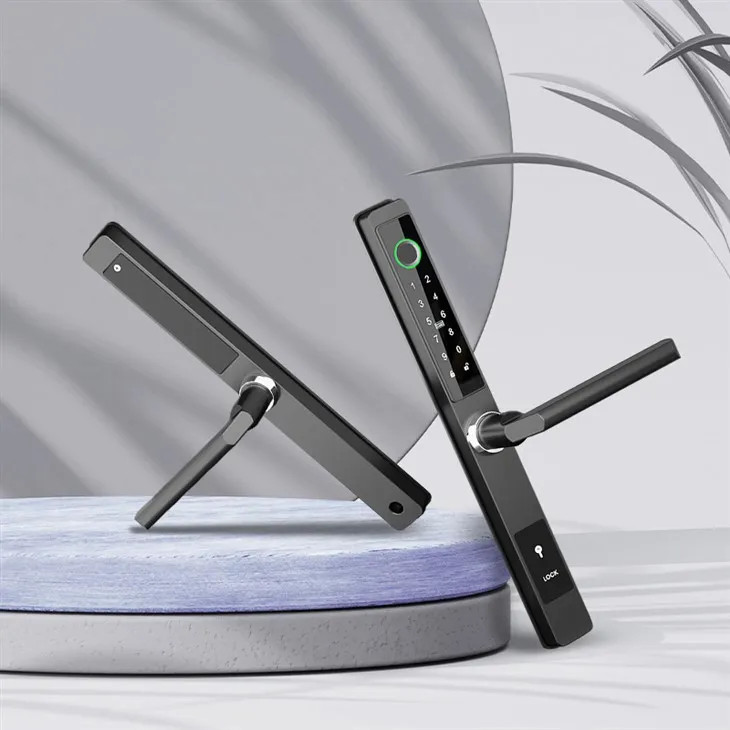

For example, if you have our Biometric Door Lock with Fingerprint Access, using the August Home app allows you to not only use fingerprint recognition but also manage access through virtual keys and remote control. It adds an extra layer of flexibility and security to your home.
How to Get Started
Getting started with using an app to control your smart door lock is pretty straightforward. First, make sure your smart door lock is properly installed. If you need any help with installation, our team of experts is always ready to assist.
Once your lock is installed, download the appropriate app from the App Store or Google Play. Follow the on - screen instructions to pair your smart door lock with the app. This usually involves scanning a QR code or entering a serial number. After the pairing is complete, you can start exploring the app's features and setting up your access preferences.
Contact Us for Purchasing and More Information
If you're interested in purchasing one of our smart door locks or have any questions about the apps or how they work with our products, don't hesitate to reach out. We're here to help you find the perfect smart door lock solution for your home. Whether you're looking for enhanced security, convenience, or both, we've got you covered.
References
- August Home official website
- Schlage Sense official documentation
- Yale Access official app details
Send Inquiry